

Enterprise Proxy
Audit and secure GroupWise proxy access rights quickly and easily for individuals and across the enterprise. Proxy access security audit reports can be output in HTML, CSV and XML and can be displayed directly within the GroupWise client. Nothing is required on the end user’s workstation.
Easily manage GroupWise proxy security
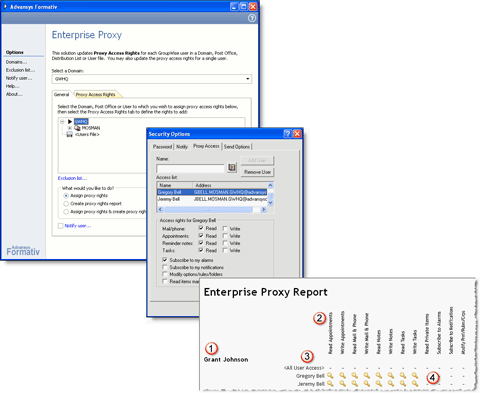
Enterprise Proxy makes it easy to audit and secure your GroupWise system’s proxy access rights for one or more GroupWise users from a central location. You can produce a proxy access audit report (in HTML, CSV or XML format) on the proxy rights that users have allocated to others.
Use Enterprise Proxy to implement and monitor corporate GroupWise proxy access policies from a single location in moments! You do not need to install additional software on end-users’ computers – simply run Enterprise Proxy from a single location to control proxy access for one or thousands of users.
Demo
Features
- Individual or enterprise-wide proxy rights allocation from a central location.
- Allocate proxy rights on a System, Domain, Post Office, Distribution List or User object level, including support for external user list text files.
- Provides the ability to update or reset existing user proxy settings.
- Detailed proxy access security reporting available in a variety of output formats (HTML, CSV or XML), including results display within the GroupWise client using a Formativ Portal.
- No software required to be installed on end-user computers.
- Easy to setup and operate.
Download Enterprise Proxy
[include-page id=”2234″]
Purchase
[include-page id=”2236″]
System Requirements
[include-page id=”2311″]
Note: The Novell GroupWise Trusted Application DLL is required to be installed on the workstation used to run the solution.
Support
[sm_smlts_infobox type=”info” clickable=”no” boldtext=”Formativ Solutions Support”]Advansys provides support via our support forums and email. For product update and support details, please see the Formativ Support page.[/sm_smlts_infobox]
Related Products
[include-page id=”2279″]